Login with User Code
User Code: this code is required to access your account through the website or the Millennium App
I don't have or remember this code

Invalid access data

Fill in the user code

Or with Digital Mobile Key

How does it work? Gov.pt

Not a Customer yet?

Open an account online
Código de Utilizador This code is required to access your account through the website or the Millennium App
Available every day from 8am to 10pm.
Specialized support line for Corporate Customers.

B2B Millennium API

Millennium in your company

Make banking inquiries and transactions directly from your management software with the B2B Millennium API

Direct banking integration into the company’s software via API

What it is and how an API works

The B2B Millennium API allows you to automate treasury processes and reduce manual tasks by integrating your company’s management software with Millennium and other banks.
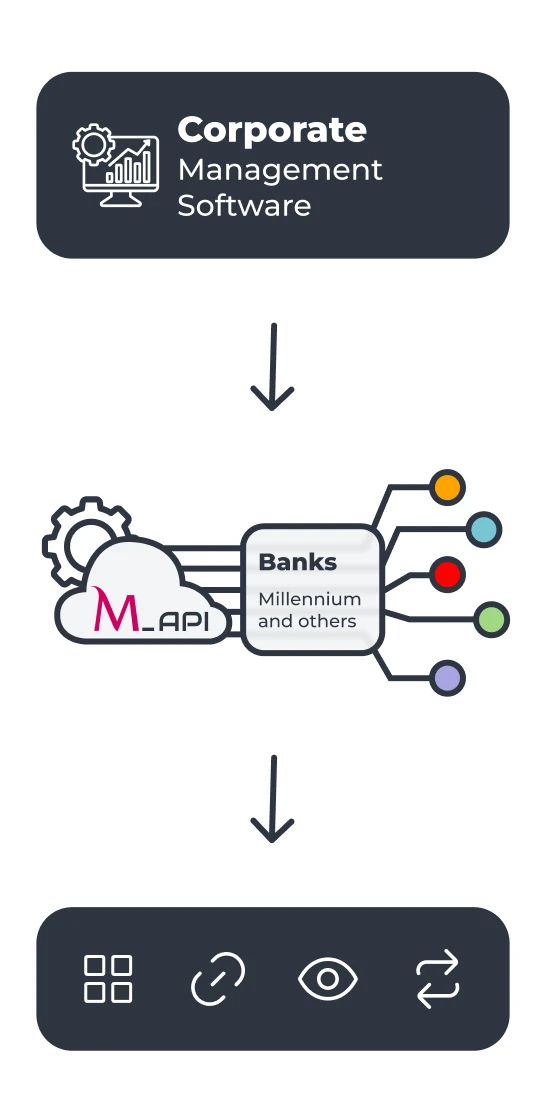
Diagram showing enterprise software integrated with banks via API and multiple features

Integration of Millennium and other bank accounts

A unified, real-time view of treasury through Open Banking integration of all accounts from all banks.

Millennium API

What you can view and do

Simplified bank reconciliation

Facilitates bank reconciliation with integrated access to statements and transaction records of Millennium accounts.

Millennium API

What you can view and do

Diagram showing enterprise software integrated with banks via API and multiple features

Integration of Millennium and other bank accounts

A unified, real-time view of treasury through Open Banking integration of all accounts from all banks.

Simplified bank reconciliation

Facilitates bank reconciliation with integrated access to statements and transaction records of Millennium accounts.

Millennium API

What you can view and do

Diagram showing enterprise software integrated with banks via API and multiple features

Integration of Millennium and other bank accounts

A unified, real-time view of treasury through Open Banking integration of all accounts from all banks.

Simplified bank reconciliation

Facilitates bank reconciliation with integrated access to statements and transaction records of Millennium accounts.

Integration with ERP systems depends on the technical context, versions, and configuration of each organization. The names and brands shown are the property of their respective owners and are used for informational purposes only.

Before, without Millennium API

Manual processes and a fragmented experience

Manual and time-consuming reconciliations

Outdated information, with transactions only available at the end of the day

Need to log in to multiple banks

After, with Millennium API

Automated processes and access to all banks

Automated reconciliations that reduce operational errors

Real-time balances and transactions with a consolidated cash-flow view

Integration of multiple banks and services into a single digital workflow

Before, without Millennium API

Manual processes and a fragmented experience

Manual and time-consuming reconciliations

Outdated information, with transactions only available at the end of the day

Need to log in to multiple banks

After, with Millennium API

Automated processes and access to all banks

Automated reconciliations that reduce operational errors

Real-time balances and transactions with a consolidated cash-flow view

Integration of multiple banks and services into a single digital workflow

SWIFT and EBICS

Integrate with other solutions

Two professionals reviewing information on a tablet in a modern corporate setting Two text boxes displaying the logos: Swift and EBICS
You can also integrate other solutions Such as Cash Management via SWIFT, which allows you to manage accounts, automate payments, centralize treasury, and obtain financial reports in a secure and standardized way, and the Multi-Bank Channel, which enables sending and receiving standardized files through software compatible with the EBICS protocol.
Two professionals reviewing information on a tablet in a modern corporate setting Two text boxes displaying the logos: Swift and EBICS
You can also integrate other solutions Such as Cash Management via SWIFT, which allows you to manage accounts, automate payments, centralize treasury, and obtain financial reports in a secure and standardized way, and the Multi-Bank Channel, which enables sending and receiving standardized files through software compatible with the EBICS protocol.

Other integration solutions

Contact us

Other integration solutions

Contact us

At a branch
At a branch
Contact your Millennium Customer Manager

How it works

Features that simplify

It allows you to access banking inquiries and operations on your Millennium accounts directly from your IT system.

API integration
Real time, management software integration with Millennium.

Inquiries
Enables balance and account movement inquiries, card transaction inquiries, and access to statements and transaction records.

Payments and transfers
Allows Documento Único de Cobrança (DUC) payments, Taxa Social Única (TSU)payments, and one-time national transfers.

Files
Enables sending C2B, FAC, DUC, and PSM files, receiving feedback on sent files, and canceling C2B files.

Check the current price list or visit one of our branches.

View price list

How to subscribe?

Only 4 steps to subscribe


What do you need?
What do you need?
To be registered and active on the Millennium bcp Corporate portal
To have an IT system that allows direct communication with the Bank
To have a digital certificate issued by an Authorized Certification Entity
To sign the usage contract (Direct Channel) with the Bank

How to subscribe?

Only 4 steps to subscribe

Contact your manager
to join B2B Direct Channel.
Activate the Direct Channel service
on the Corporate portal under Other Services > Direct Channel.

Upload
Upload
the User’s Digital Certificate Public Key.

Download
Download
the Millennium bcp Digital Certificate Public Key.
What do you need?
What do you need?
To be registered and active on the Millennium bcp Corporate portal
To have an IT system that allows direct communication with the Bank
To have a digital certificate issued by an Authorized Certification Entity
To sign the usage contract (Direct Channel) with the Bank

Open your Corporate account

100% online

in minutes

hassle-free

Open account online
woman with a gray blazer and glasses, arms crossed, smiling

Frequent questions

Questions? We’ll help

The Direct Channel is a B2B solution that enables automatic communication between your company’s IT system (ERP) and Millennium bcp. Through web services, you can carry out banking operations directly within your software, with security, speed, and without manual intervention.

The Direct Channel is a B2B solution that enables automatic communication between your company’s IT system (ERP) and Millennium bcp. Through web services, you can carry out banking operations directly within your software, with security, speed, and without manual intervention.

The authentication is made with:

  • User code and password;
  • Digital Certificate (Public and Private Key);
  • Encrypted communication digitally signed.

The authentication is made with:

  • User code and password;
  • Digital Certificate (Public and Private Key);
  • Encrypted communication digitally signed.

You need to contact the Authorized Certification Entity. If you want to get a Multicert Advanced Individual Professional Certificate, you can request it here.

You need to contact the Authorized Certification Entity. If you want to get a Multicert Advanced Individual Professional Certificate, you can request it here.

An Authorized Certification Entity issues digital certificates to identify individuals, systems, or entities in computer networks. By digitally signing the certificates, the Certification Entity links the holder's identity and private key to the certificate's public key.

An Authorized Certification Entity issues digital certificates to identify individuals, systems, or entities in computer networks. By digitally signing the certificates, the Certification Entity links the holder's identity and private key to the certificate's public key.

After receiving our instructions (via email), you must activate access to the Direct Integration on the Millennium bcp homebanking. To do this, simply go to Other Services > Canal Direto and select the 'Activate' option. The activation is completed automatically once you provide the access IP and upload the Public Key of the Digital Certificate.

After receiving our instructions (via email), you must activate access to the Direct Integration on the Millennium bcp homebanking. To do this, simply go to Other Services > Canal Direto and select the 'Activate' option. The activation is completed automatically once you provide the access IP and upload the Public Key of the Digital Certificate.

Frequent questions

Questions? We’ll help

The Direct Channel is a B2B solution that enables automatic communication between your company’s IT system (ERP) and Millennium bcp. Through web services, you can carry out banking operations directly within your software, with security, speed, and without manual intervention.

The Direct Channel is a B2B solution that enables automatic communication between your company’s IT system (ERP) and Millennium bcp. Through web services, you can carry out banking operations directly within your software, with security, speed, and without manual intervention.

The authentication is made with:

  • User code and password;
  • Digital Certificate (Public and Private Key);
  • Encrypted communication digitally signed.

The authentication is made with:

  • User code and password;
  • Digital Certificate (Public and Private Key);
  • Encrypted communication digitally signed.

You need to contact the Authorized Certification Entity. If you want to get a Multicert Advanced Individual Professional Certificate, you can request it here.

You need to contact the Authorized Certification Entity. If you want to get a Multicert Advanced Individual Professional Certificate, you can request it here.

An Authorized Certification Entity issues digital certificates to identify individuals, systems, or entities in computer networks. By digitally signing the certificates, the Certification Entity links the holder's identity and private key to the certificate's public key.

An Authorized Certification Entity issues digital certificates to identify individuals, systems, or entities in computer networks. By digitally signing the certificates, the Certification Entity links the holder's identity and private key to the certificate's public key.

After receiving our instructions (via email), you must activate access to the Direct Integration on the Millennium bcp homebanking. To do this, simply go to Other Services > Canal Direto and select the 'Activate' option. The activation is completed automatically once you provide the access IP and upload the Public Key of the Digital Certificate.

After receiving our instructions (via email), you must activate access to the Direct Integration on the Millennium bcp homebanking. To do this, simply go to Other Services > Canal Direto and select the 'Activate' option. The activation is completed automatically once you provide the access IP and upload the Public Key of the Digital Certificate.


Need help?

We are here for you

Looking for a branch?
Find the nearest branch
Need to call us?
Call 21 004 24 24 (call to national landline)
Looking for a branch?
Find the nearest branch
Need to call us?
Call 21 004 24 24 (call to national landline)